Overview
There are multiple document formats for documentation out there. Markdown, ReStructured text, AsciiDoc and many others. And while it seems Markdown has won, I prefer to use AsciiDoc and in this post I enumerate 6 reasons why.
1) Support for multiple backends
-
A single project can be transformed into a html5 document, a pdf or an ebook.
-
Interactive slides with code interpretation and highlighting with asciidoctor-reveal.js
-
This blog is written in AsciiDoc
2) File includes
AsciiDoc offers a powerful file include mechanism, can include a whole file, or a specific section or even multiple sections. It can include other asciidoc files, or source files. This feature can be leveraged to ensure the documentation is not out of sync with the application/service code.
The following AsciiDoc snippet includes a whole file as a source block:
[source, typescript]
-----
.AsciiDoctor include
include::PlaywrightTestCase.ts[]
-----
Produces the following output (click to reveal)
import { test, expect } from '@playwright/test';

test('has title', async ({ page }) => {
await page.goto('https://google.com/');

    // Expect a title "to contain" a substring.
    await expect(page).toHaveTitle(/Playwright/);
});

test('get started link', async ({ page }) => {
await page.goto('https://playwright.dev/');

    // Click the get started link.
    await page.getByRole('link', { name: 'Get started' }).click();

    // Expects page to have a heading with the name of Installation.
    await expect(page.getByRole('heading', { name: 'Installation' })).toBeVisible();
});
We can also use include with the lines attribute to just include a section
[source, typescript]
.AsciiDoctor include with lines attribute
------
include::PlaywrightTestCase.ts[lines=1..8]
------
Produces the following output (click to reveal)
import { test, expect } from '@playwright/test';

test('has title', async ({ page }) => {
    await page.goto('https://google.com/');

    // Expect a title "to contain" a substring.
    await expect(page).toHaveTitle(/Playwright/);
});
There is also the possibility to include remote files or to use tags to delimiter what is included on the source block.
3) Diagram as code support
AsciiDoc supports a variety of diagrams
|
The asciidoctor-diagram gem needs to be installed. Different diagrams have different requirements, staruml requires java, mermaid requires nodejs |
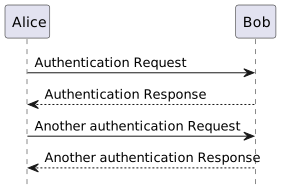
For example here it is the AsciiDoc code to define a plantuml sequence diagram
[plantuml,"cycle", "svg", role=sequence, title='Plant Uml diagram']
------
!pragma graphviz_dot jdot

@startuml
hide footbox

Alice -> Bob: Authentication Request
Bob --> Alice: Authentication Response

Alice -> Bob: Another authentication Request
Alice <-- Bob: Another authentication Response

@enduml
------
Produces the following diagram (click to reveal)
4) Powerful tables
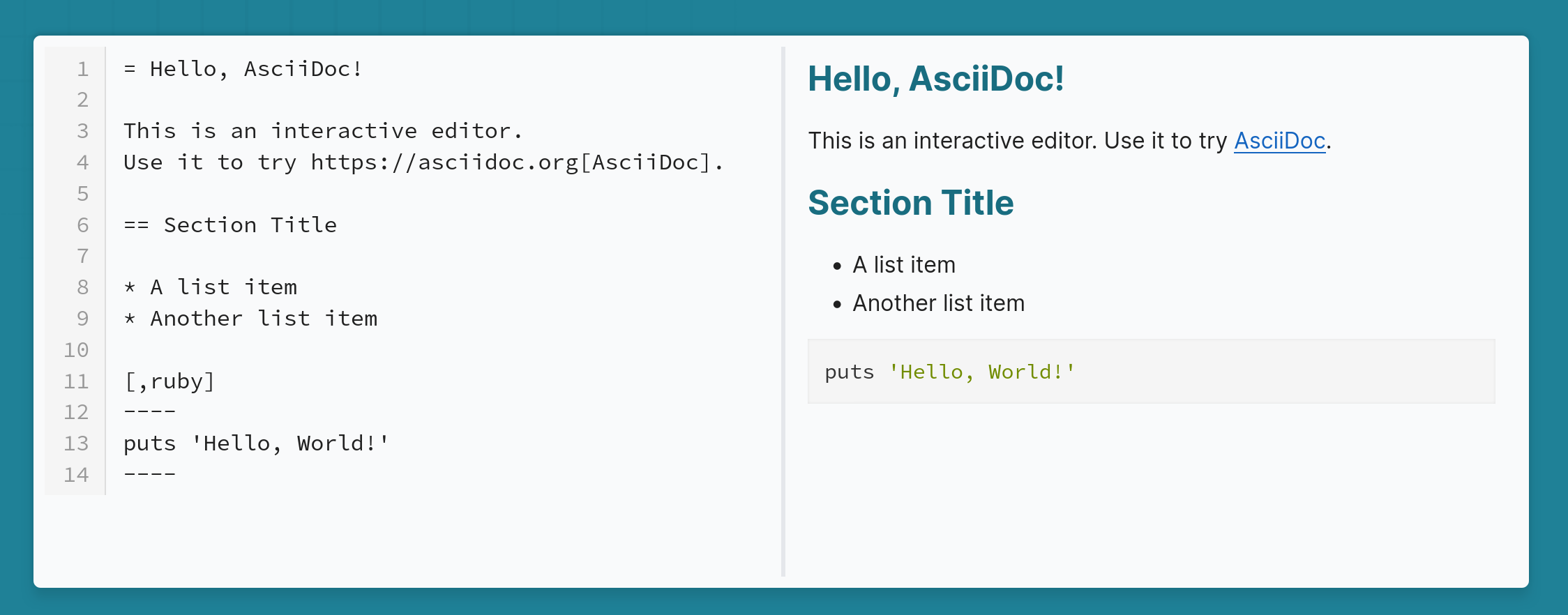
The following table with source block codes and nested tables is difficult to build with markdown.
| Header 1 | Header 2 | Header 3 | ||||||
|---|---|---|---|---|---|---|---|---|
|
|
Use
|
||||||
This row has a cell with colspan=3 Hello world source block
|
||||||||
|
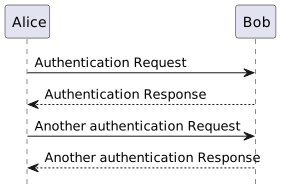
Figure 2. Another Diagram
|
|||||||
AsciiDoc code for the table above
    [cols="1a,1a,1a"]
    |===
    |Header 1 |Header 2 |Header 3

    |
    - Unordered list
    - Another bullet

    |
    TIP: To be able to insert rich content on the table, make sure to use `AsciiDoc` style (`a`) on the https://docs.asciidoctor.org/asciidoc/latest/tables/format-column-content/#cols-style[column definition] or in front of the https://docs.asciidoctor.org/asciidoc/latest/tables/format-cell-content/#a-operator[cell separator]
    |

    [cols="2,1"]
    Use `!===` to start a nested table and use `!` as the column separator, for this to work the column must have `a` https://docs.asciidoctor.org/asciidoc/latest/tables/format-column-content/[style operator]
    !===
    ! Header1 ! Header2

    ! C11
    ! C12


    3+| This row has a cell with colspan=3

    .Source
    [source, java]
    .Hello world source block
    ----
    public static void main(String [] args){
    sout("Hallo source block from within AsciiDoc!!");
    }
    ----


    ^| image::/2024/10/28/why-i-prefer-asciidoc-for-technical-documentation/asciidoc-logo.png[alt="Logo"]

    2+^|
    [plantuml,"cycle-2", "svg", role=sequence,title="Another Diagram"]
    ----
    !pragma graphviz_dot jdot
    @startuml
    hide footbox

    Alice -> Bob: Authentication Request
    Bob --> Alice: Authentication Response

    Alice -> Bob: Another authentication Request
    Alice <-- Bob: Another authentication Response

    @enduml
    ----


    |===
5) Code callouts
Code callouts allow to explain an example source code block step by step, I found them very useful as a reader and when trying to explain API’s or SDK’s.
@ApplicationScoped
@Identifier("RedisHostProvider") (1)
public class RedisConfig implements RedisHostsProvider {
    @Override
    public Set<URI> getHosts() {
        // do stuff to get the host
        String host = System.getenv("REDIS_CONNECTION_STRING");  (2)
        if (host == null){ (3)
            throw new RuntimeException("Unable to configure redis server, please set secret/env variable REDIS_CONNECTION_STRING");
        }
        return Collections.singleton(URI.create(host));
    }
}| 1 | Use in application.properties as follows |
| 2 | Locate the configuration using an environment variable |
| 3 | If the variable is not defined throw error. |
6) Tooling Ecosystem
You can find several tools,plugins and extensions for AsciiDoc.
As an avid JetBrains user, I think the best by far is the excellent AsciiDoc plugin for JetBrains IDE’s like IntelliJ, PyCharm and WebStorm.
For Visual Studio Code you’ll find several extensions, with AsciiDoc being the official option.
The project also offers an official browser extension that previews documents and works with Chrome, Firefox, Edge and other browsers.
Additional Resources
The first time I learned about AsciiDoc and AsciiDoctor was at Devoxx 2017 conference. It was on the talk Asciidoctor: New, Noteworthy, and Beyond by Alex Soto
And here are some links/blogs resources
Comments
To add comments, reply in my Bluesky post