:!figure-caption:.
Overview
Most software organizations are always obsessed with speed as in "Ship it!! Customer needs it for yesteryay!!", hurrying up to meet these deadlines without taking other aspects into consideration.
One of those aspects not considered is the security of the supply chain. Dependencies are not checked, and not wanting to reinvent the wheel developers would prefer to install a package that does most of the work for them. However, the more third party dependencies we have the bigger risk to have critical vulnerabilities.
One tool easy to include in the SDLC pipeline that helps to find vulnerabilities and misconfigurations is Trivy. Given it can scan a code repository, a docker image, your infrastructure as code & configurations you could say it’s a DevSecOps swiss army knife (one all in one tool).
In this post, I will show how to use Trivy to find issues in your git repository and final artifacts.
-
Scanning for secrets and do it on a pre-commit hook.
-
Scanning your repository for vulnerabilities and licenses
Before you start
If you want to follow along the examples in this post , you should have:
-
Trivy installed , (see Install Trivy)
-
python 3.10 or greater (for pre-commit)
-
Node.js with yarn
-
Docker (to build a docker image locally)
-
git, curl installed
-
Have a Gitlab account
Install Trivy
Install Trivy by using brew package manager
brew install trivyFollow the link below to install with your distribution
Open a Windows PowerShell Admin session and run
choco install -y trivy| This is an unofficial trivy package, check the package github repo |
As with many CLI packages, the latest package is available in its repository releases.
Verifying the installation
Once installed you can issue your first trivy scan as follows
trivy repo https://github.com/aquasecurity/trivy-ci-test (1) (2)| 1 | repo is the trivy command to execute, in the future it will replace fs which is file system scanner |
| 2 | url of the repository to scan. If it’s a private repository an environment variable such as $GITHUB_TOKEN or $GITLAB_TOKEN must be defined. A local directory containing the cloned repository can be specified instead of the url. |
By default, Trivy will scan for secrets and vulnerabilities, reporting them in a table format, in this case identified the project has a rust project and a python project and report the vulnerabilities for both.
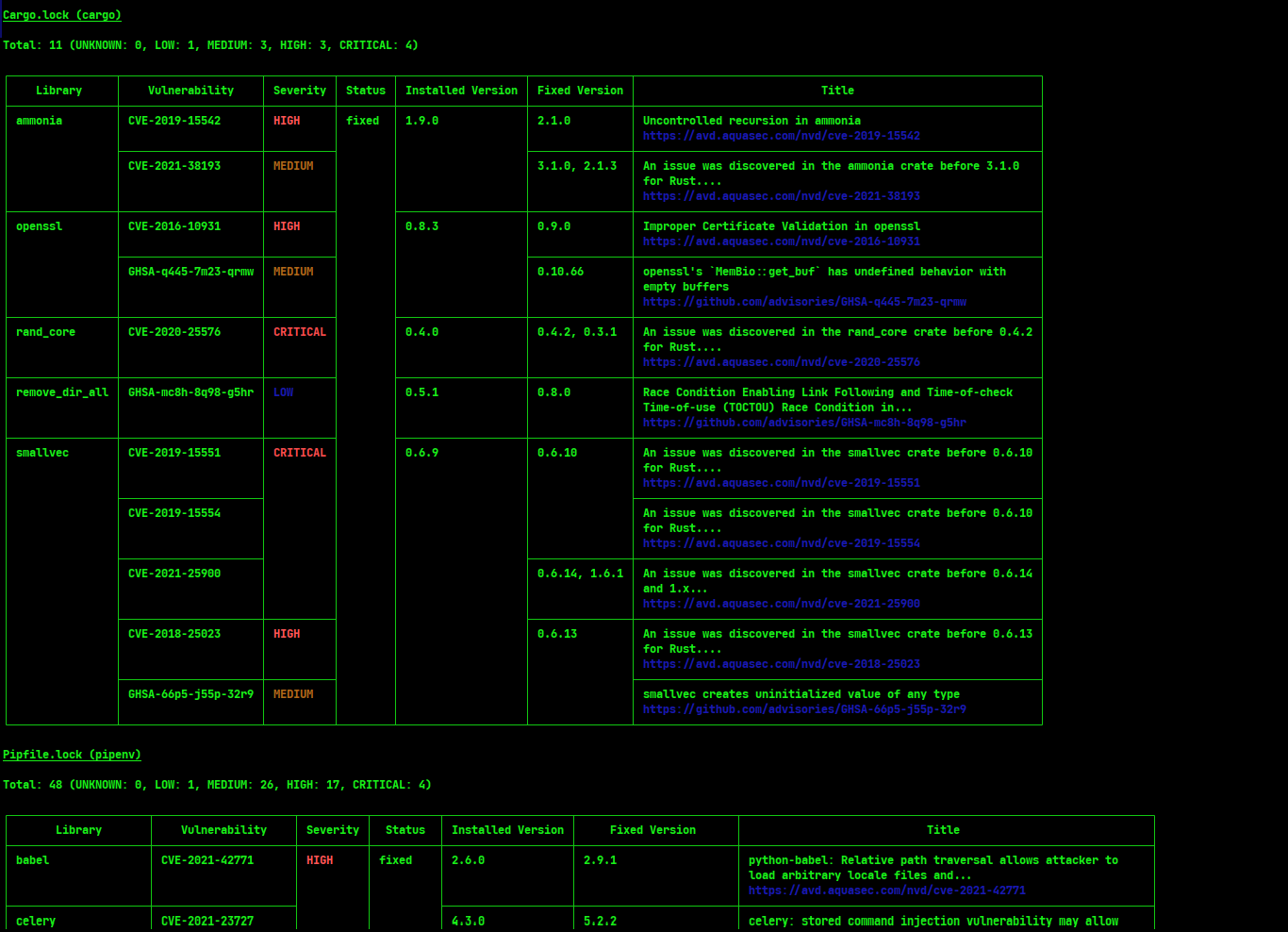
Scanning a repository
Trivy can scan multiple targets, it can be a docker image, your cloud infrastructure or virtual machines or a file system / repository.
For the following big section we will use trivy repo command that can scan for secrets, misconfigurations, licenses and more important vulnerabilities in your dependencies.
Currently, this can also be done with trivy fs which stands for scanning a file system, but it will be completely replaced with trivy repo. See the details in this GitHub issue
Scanning for secrets with Trivy
Trivy can help to detect a variety of different credentials like AWS keys, API tokens, GitHub/Gitlab tokens and all kinds of credentials. Let’s see how.
For this first exercise we will use the juice-shop project, this is an OWASP example project that contains several vulnerabilities, used as an example for pen testing and other security testing activities. In this case we only care about secrets. So, with not much further ado let’s see how Trivy can help us to detect secrets.
Without even cloning the repository we can instruct Trivy to look for secrets in the repository with the following command:
trivy repo --scanners secret -q https://github.com/juice-shop/juice-shop (1) (2)| 1 | with --scanners flag we instruct Trivy to only scan for secrets |
| 2 | --quiet or -q flag instructs Trivy to have reduced output |
At the moment of writing this document, the previous Trivy command’s output would be something like this
frontend/src/app/last-login-ip/last-login-ip.component.spec.ts (secrets)

Total: 1 (UNKNOWN: 0, LOW: 0, MEDIUM: 1, HIGH: 0, CRITICAL: 0)

MEDIUM: JWT (jwt-token)
═════════════════════════════════════════════════════════════════════════════════════════════════════════════════════════════════════════════════════════════════════════════════════════════════════════════════════════════════════════════════════════════════════════════════════════
JWT token
─────────────────────────────────────────────────────────────────────────────────────────────────────────────────────────────────────────────────────────────────────────────────────────────────────────────────────────────────────────────────────────────────────────────────────────
 frontend/src/app/last-login-ip/last-login-ip.component.spec.ts:50 (1)
─────────────────────────────────────────────────────────────────────────────────────────────────────────────────────────────────────────────────────────────────────────────────────────────────────────────────────────────────────────────────────────────────────────────────────────
  48
  49     xit('should set Last-Login IP from JWT as trusted HTML', () => { // FIXME Expected state seems to
  50 [ ocalStorage.setItem('token', '*******************************************************************************************************************************')
  51       component.ngOnInit()
─────────────────────────────────────────────────────────────────────────────────────────────────────────────────────────────────────────────────────────────────────────────────────────────────────────────────────────────────────────────────────────────────────────────────────────


lib/insecurity.ts (secrets)

Total: 1 (UNKNOWN: 0, LOW: 0, MEDIUM: 0, HIGH: 1, CRITICAL: 0)

HIGH: AsymmetricPrivateKey (private-key)
═════════════════════════════════════════════════════════════════════════════════════════════════════════════════════════════════════════════════════════════════════════════════════════════════════════════════════════════════════════════════════════════════════════════════════════
Asymmetric Private Key
─────────────────────────────────────────────────────────────────────────────────────────────────────────────────────────────────────────────────────────────────────────────────────────────────────────────────────────────────────────────────────────────────────────────────────────
 lib/insecurity.ts:23 (2)
─────────────────────────────────────────────────────────────────────────────────────────────────────────────────────────────────────────────────────────────────────────────────────────────────────────────────────────────────────────────────────────────────────────────────────────
  21
  22   export const publicKey = fs ? fs.readFileSync('encryptionkeys/jwt.pub', 'utf8') : 'placeholder-publi
  23 [ ----BEGIN RSA PRIVATE KEY-----****************************************************************************************************************************************************************************************************************************************************************************************************************************************************************************************************************************************************************************************************************************************************************************************************************************************************************************************************************************************************************************************************************************************************-----END RSA PRIVATE
  24
─────────────────────────────────────────────────────────────────────────────────────────────────────────────────────────────────────────────────────────────────────────────────────────────────────────────────────────────────────────────────────────────────────────────────────────


frontend/src/app/app.guard.spec.ts (secrets) (3)

Total: 1 (UNKNOWN: 0, LOW: 0, MEDIUM: 1, HIGH: 0, CRITICAL: 0)

MEDIUM: JWT (jwt-token)
═════════════════════════════════════════════════════════════════════════════════════════════════════════════════════════════════════════════════════════════════════════════════════════════════════════════════════════════════════════════════════════════════════════════════════════
JWT token
─────────────────────────────────────────────────────────────────────────────────────────────────────────────────────────────────────────────────────────────────────────────────────────────────────────────────────────────────────────────────────────────────────────────────────────
 frontend/src/app/app.guard.spec.ts:40
─────────────────────────────────────────────────────────────────────────────────────────────────────────────────────────────────────────────────────────────────────────────────────────────────────────────────────────────────────────────────────────────────────────────────────────
  38
  39     it('returns payload from decoding a valid JWT', inject([LoginGuard], (guard: LoginGuard) => {
  40 [ ocalStorage.setItem('token', '***********************************************************************************************************************************************************')
  41       expect(guard.tokenDecode()).toEqual({
─────────────────────────────────────────────────────────────────────────────────────────────────────────────────────────────────────────────────────────────────────────────────────────────────────────────────────────────────────────────────────────────────────────────────────────
| 1 | Found jwt-token secret on test file |
| 2 | Found a private-key secret on a lib file |
| 3 | Found jwt-token secret on test file |
Trivy has found 2 secrets in test files and 1 secret on a library file, however if we check the exit code of the previous command we see it’s zero, meaning there was no error.
echo $?
0
Let’s tell Trivy to ignore the secrets on the spec/test files and to give us a non-zero (error) return code if it finds any secrets. We do this by using --skip-files and --exit-code flags as stated in the following command:
trivy repo --scanners secret --skip-files '**/*.spec.*' --exit-code 10 -q https://github.com/juice-shop/juice-shoplib/insecurity.ts (secrets)
Total: 1 (UNKNOWN: 0, LOW: 0, MEDIUM: 0, HIGH: 1, CRITICAL: 0)
HIGH: AsymmetricPrivateKey (private-key)
══════════════════════════════════════════════════════════════════════════════════════════════════════════════════════════════════════════════════════════════════════════════════════════════════════════════════════════════════════════════════════
Asymmetric Private Key
──────────────────────────────────────────────────────────────────────────────────────────────────────────────────────────────────────────────────────────────────────────────────────────────────────────────────────────────────────────────────────
lib/insecurity.ts:23
──────────────────────────────────────────────────────────────────────────────────────────────────────────────────────────────────────────────────────────────────────────────────────────────────────────────────────────────────────────────────────
21
22 export const publicKey = fs ? fs.readFileSync('encryptionkeys/jwt.pub', 'utf8') : 'placeholder-publi
23 [ ----BEGIN RSA PRIVATE KEY-----****************************************************************************************************************************************************************************************************************************************************************************************************************************************************************************************************************************************************************************************************************************************************************************************************************************************************************************************************************************************************************************************************************************************************-----END RSA PRIVATE
24
──────────────────────────────────────────────────────────────────────────────────────────────────────────────────────────────────────────────────────────────────────────────────────────────────────────────────────────────────────────────────────
If we check the return code again:
echo $?
10
Now it’s a non-zero exit code which it means error, this will be handy to abort the commit.
| It is worth mentioning that the secrets are only reported on table format, if generating a html report or any other format, unless the report template includes it, the secrets won’t be included in such report. See GitHub issue |
Using Trivy on a pre-commit-hook
Given all the work that needs to be done to fix issues when a secret make it’s way to a git repository or to an artifact, it’s wise to have a process to avoid credential leaking in the git repository or final deliverable packages.
One way to do this is with a pre-commit-hook, we will use pre-commit and pablomxnl/repo-secret-pre-commit which requires python.
Execute the following commands in the root of your git repository working copy.
-
Install pre-commit
Install pre-commitpip install pre-commit -
Add a
.pre-commit-config.yamlfilepre-commit-config.yamlrepos: - repo: https://gitlab.com/pablomxnl/repo-secret-pre-commit.git rev: 0.0.2 hooks: - id: repo_secret_pre_commit args: - --quiet -
Execute command pre-commit install
install pre-commit hookpre-commit install
From now on, every commit will be inspected with Trivy and if it finds any secret on the files included in the commit, the commit will fail.
|
pre-commit on system path and IDE’s, editors and shell
For the hook to work, pre-commit must be on the system path, available to your IDE or shell session. |
To test the hook is working, let’s try to commit a file containing secrets.
curl https://raw.githubusercontent.com/trufflesecurity/test_keys/refs/heads/main/new_key -o newfile.tomlgit add newfile.tomlgit commit -m"test pre-commit hook"[INFO] Initializing environment for https://gitlab.com/pablomxnl/repo-secret-pre-commit.git. [INFO] Installing environment for https://gitlab.com/pablomxnl/repo-secret-pre-commit.git. [INFO] Once installed this environment will be reused. [INFO] This may take a few minutes... repo_secret_pre_commit...................................................Failed - hook id: repo_secret_pre_commit - duration: 0.17s - exit code: 1 newfile.toml (secrets) Total: 2 (UNKNOWN: 0, LOW: 0, MEDIUM: 0, HIGH: 0, CRITICAL: 2) CRITICAL: AWS (aws-access-key-id) ════════════════════════════════════════ AWS Access Key ID ──────────────────────────────────────── newfile.toml:2 ──────────────────────────────────────── 1 [default] 2 [ aws_access_key_id = ******************** 3 aws_secret_access_key = **************************************** ──────────────────────────────────────── CRITICAL: AWS (aws-secret-access-key) ════════════════════════════════════════ AWS Secret Access Key ──────────────────────────────────────── newfile.toml:3 ──────────────────────────────────────── 1 [default] 2 aws_access_key_id = ******************** 3 [ aws_secret_access_key = **************************************** 4 output = json ──────────────────────────────────────── Trivy finished with return code 1
So, the pre-commit hook was executed from the current shell, and since it failed, aborted the commit.
The following screenshot shows how the hook also aborted a commit done through the PyCharm user interface
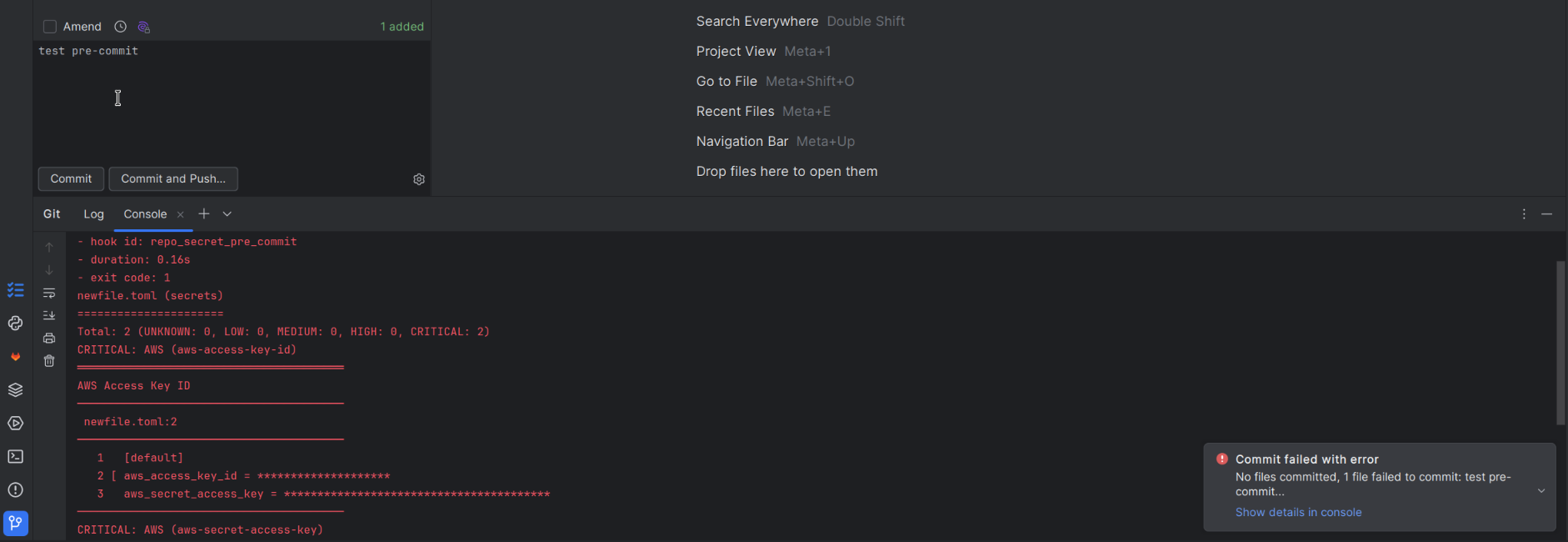
Scanning for vulnerabilities
For the following sections we will use a React todo web application example from the mozilla MDN web docs.
-
Clone the repository
clone repogit clone https://github.com/mdn/todo-react -
Change directory to the project and add a dependency with vulnerabilities
add dependency with vulnerabilitycd todo-react && yarn add [email protected] -
Scan for vulnerabilities and fail if found CRITICAL or HIGH
scan for vulnerabilitiestrivy repo -q --scanners vuln --exit-code 1 --severity CRITICAL . (1)1 The --severityflag filters for vulnerabilities of the given argument. If omitted defaults to all of them: "UNKNOWN,LOW,MEDIUM,HIGH,CRITICAL"
yarn.lock (yarn)

Total: 2 (CRITICAL: 2)

┌─────────┬────────────────┬──────────┬────────┬───────────────────┬───────────────┬──────────────────────────────────────────────────┐
│ Library │ Vulnerability  │ Severity │ Status │ Installed Version │ Fixed Version │                      Title                       │
├─────────┼────────────────┼──────────┼────────┼───────────────────┼───────────────┼──────────────────────────────────────────────────┤
│ mysql2  │ CVE-2024-21508 │ CRITICAL │ fixed  │ 3.9.2             │ 3.9.4         │ mysql2: Remote Code Execution                    │
│         │                │          │        │                   │               │ https://avd.aquasec.com/nvd/cve-2024-21508       │
│         ├────────────────┤          │        │                   ├───────────────┼──────────────────────────────────────────────────┤
│         │ CVE-2024-21511 │          │        │                   │ 3.9.7         │ mysql2: Arbitrary Code Injection due to improper │
│         │                │          │        │                   │               │ sanitization of the timezone parameter...        │
│         │                │          │        │                   │               │ https://avd.aquasec.com/nvd/cve-2024-21511       │
└─────────┴────────────────┴──────────┴────────┴───────────────────┴───────────────┴──────────────────────────────────────────────────┘
Depending on the policies of your organization might want to fail the build on CRITICAL and HIGH, but also gather all of them, for example those UNKNOWN might need to be inspected to see the risk/impact that presents.
Scanning for licenses
Your organization hopefully has some policies of the kind of licenses can you use for your dependencies. Typically want to avoid having dependencies that may force you to redistribute your source code if your code base is proprietary or IP protected.
Trivy also has a license scanner that inspects the licenses of packages installed with
apk, apt-get, dnf, npm, pip, gem, maven, gradle etc
Depending on which language and package manager your application has, for some it’s enough to scan the lock file or dependencies file,
for example for a java maven or gradle project is enough the pom.xml file or the gradle.lockfile, however for others a install is required before scanning, for example Node.js projects require to do a npm|yarn|pnpm install before scanning for licenses.
Continuing with the React todo application from the previous point let’s scan for licenses
-
Issue a yarn install command
yarn installyarn install -
Scan for licenses which have a classification with severity HIGH,CRITICAL,UNKNOWN
trivy repo license scantrivy repo -q --scanners license --severity CRITICAL,HIGH,UNKNOWN --skip-files ./LICENSE . (1)1 with --skip-files ./LICENSEwe exclude the LICENSE file of the application itself
At the moment of writing this, the output of the previous command is empty. Let’s add a dependency with a restrictive license that would be classified as severity HIGH
-
Add a dependency with a restrictive license
yarn add commandyarn add @etn-sc/web3 -
Issue the same
Trivyrepo commandtrivy repo license scantrivy repo -q --scanners license --severity CRITICAL,HIGH,UNKNOWN --skip-files ./LICENSE --exit-code 1
Now trivy finds the restrictive licenses and since we used the --exit-code 1 flag returns error:
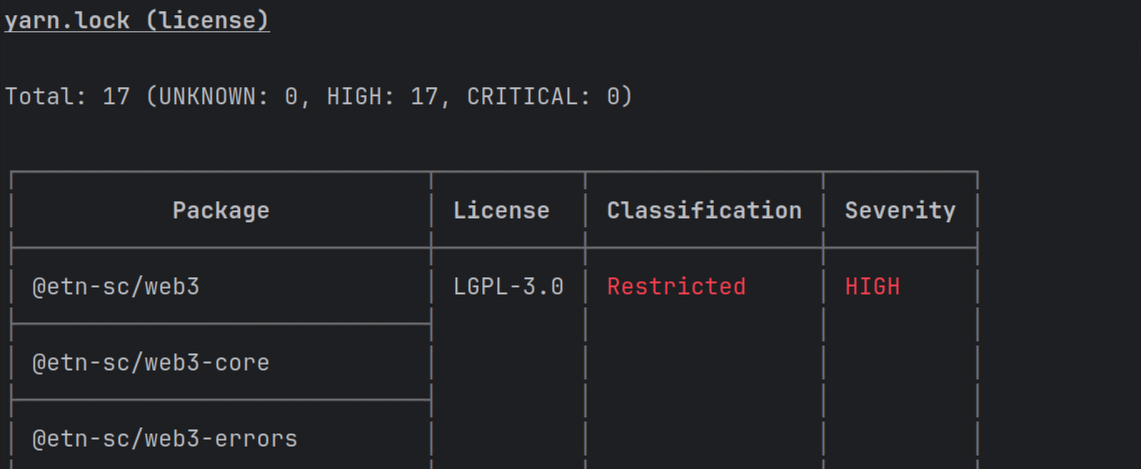
Scanning docker images
Similar to repo command , trivy offers the image command that scans either local or remote docker images.
Continuing with the example repository, lets add a nginx server Dockerfile to serve the bundle of the react app. Let’s choose intentionally an outdated base image to get vulnerabilities on the image.
-
Add a Dockerfile
DockerfileFROM nginx:1.21.0-alpine COPY dist /usr/share/nginx/html COPY nginx.conf /etc/nginx/conf.d/default.conf EXPOSE 80 CMD ["nginx", "-g", "daemon off;"] -
Build the Node.js project before building the docker image
yarn buildyarn build -
Build the docker image
Docker builddocker build -t thedude/todo-react:0.0.1 . (1) (2)1 The -tindicates the tag to identify the image, make sure to use the same on the trivy image command2 In this case this docker image is not going to be pushed to any docker registry, if it were the tag must match your user/docker registry organization. -
Scan the image with Trivy
trivy imagetrivy image thedude/todo-react:0.0.1 --severity CRITICAL --exit-code 1The previous command gives the following output
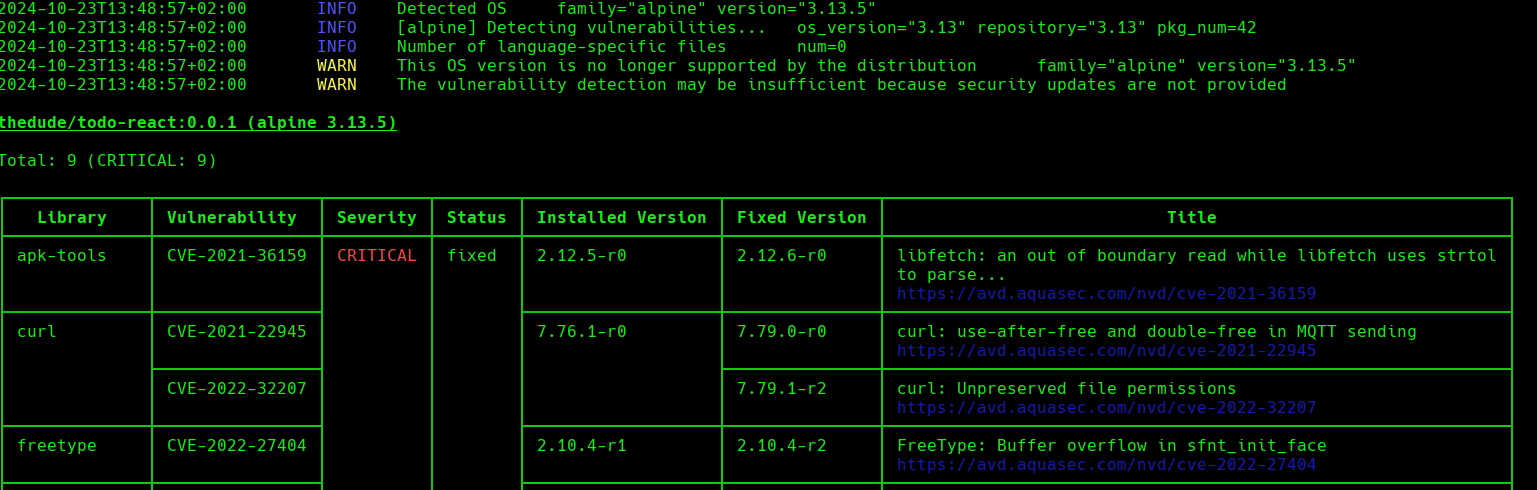 Figure 4. trivy image scan output
Note that besides the critical vulnerabilities there are some warnings about the OS version no longer supported. There is the flag
--exit-on-eol 1to force a non-zero result code if the base image is at end of life with no more updates. -
Use a better base image
Now, let’s use a most recently built base image and preferably without known vulnerabilities, let’s change the first line of the
DockerfilefromFROM nginx:1.21.0-alpinetoFROM chainguard/nginx:latestUpdated DockerfileFROM chainguard/nginx:latest COPY dist /usr/share/nginx/html COPY nginx.conf /etc/nginx/conf.d/default.conf EXPOSE 80 CMD ["nginx", "-g", "daemon off;"] -
Rebuild the docker image
docker builddocker build -t thedude/todo-react:0.0.2 . -
Scan the new image with Trivy
trivy imagetrivy -q image thedude/todo-react:0.0.2 --exit-code 1 --exit-on-eol 1The result of the scan is now empty with no known vulnerabilities:
Output of trivy scanthedude/todo-react:0.0.2 (wolfi 20230201) Total: 0 (UNKNOWN: 0, LOW: 0, MEDIUM: 0, HIGH: 0, CRITICAL: 0) $echo $? 0
Using Trivy on Gitlab CI pipeline
Finally, let’s integrate trivy into a Gitlab-CI pipeline.
-
Rename origin
git remote renamegit remote rename origin old-origin -
Add origin using your gitlab username
git remote add origingit remote add origin [email protected]:put_your_gitlab_user_name_here/todo-react.git (1)1 Make sure to put your gitlab username / organisation path -
Add the following initial gitlab-ci file
initial .gitlab-ci.ymlstages: - build - test (1) - publish (2) include: - component: "$CI_SERVER_FQDN/to-be-continuous/node/[email protected]" (3) inputs: audit-disabled: true outdated-disabled: true semgrep-disabled: true sbom-disabled: true build-args: 'run build' publish-enabled: false node-build: artifacts: reports: paths: - $NODE_PROJECT_DIR/$NODE_BUILD_DIR - $NODE_PROJECT_DIR/node_modules1 Needed for node-audit job from the Node.js to-be-continuous cicd component, even that it is disabled 2 Needed for node-publish job from the Node.js to-be-continuous cicd component, even that it is disabled 3 Node.js to-be-continuous gitlab cicd component, disabling some jobs and customizing the build command -
Modify
package.jsonto include a test scriptadd test script topackage.json"test": "echo test", -
Commit and push the changes
git add / git commit / git pushgit add . git commit -m"Add pipeline file, fake test script" git push --set-upstream origin mainHopefully after this soon, you’ll see a pipeline executing just one job
node-buildand successfully just did yarn build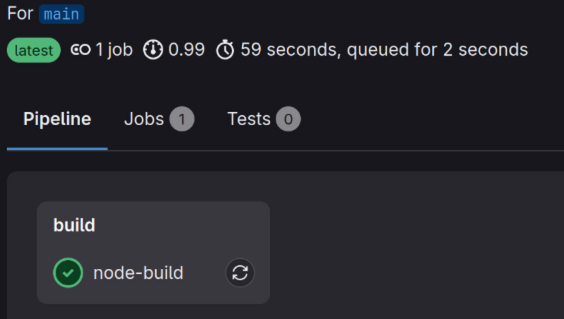 Figure 5. Gitlab CI sucessful pipeline node-build job
 -
Add
scan-packagestage to the gitlab-ci stages listgitlab-ci.ymlstages: - build - test - publish - scan-package -
Add trivy cicd component and make
license_scanjob depend on thenode-buildjobgitlab-ci.yml#Trivy component - component: $CI_SERVER_FQDN/pablomxnl/trivy_component/gitlab-ci-trivy@~latest inputs: trivy-db-repository: "$CI_REGISTRY_IMAGE/trivy-db:2" trivy-java-db-repository: "$CI_REGISTRY_IMAGE/trivy-java-db:1" trivy-checks-bundle-repository: "$CI_REGISTRY_IMAGE/trivy-checks:1" container-scan-enabled: false trivy-license-severity-treshold: "CRITICAL,HIGH" trivy-vulnerability-severity-treshold: "CRITICAL" trivy-repo-stage: "build" license_scan: needs: - node-build -
Commit and push the .gitlab-ci.yml file
git commit and pushgit add .gitlab-ci.yml git commit -m"Add trivy cicd component" git pushAfter pushing now the pipeline will include the jobs to run
trivy repocommands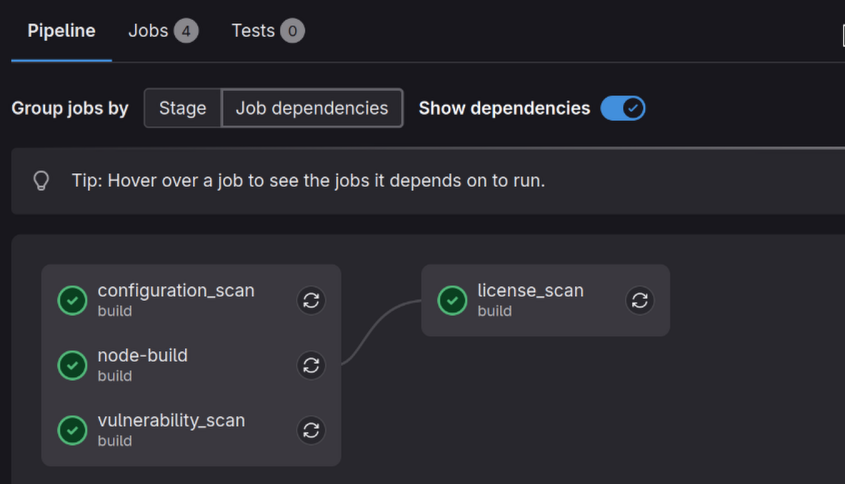 Figure 6. Pipeline with trivy repo jobs
 -
Add
package-buildandpackage-testto the stages listgitlab-ci.ymlstages: - build - test - package-build - package-test - scan-package - publish -
Add the docker cicd component from the to-be-continuous project
gitlab-ci.yml- component: "$CI_SERVER_FQDN/to-be-continuous/docker/[email protected]" inputs: prod-publish-strategy: "auto" hadolint-disabled: true healthcheck-disabled: true sbom-disabled: true trivy-disabled: true -
Remove the input
container-scan-enabled: falsefrom the trivy component or change its value to true, add the inputdocker-image-to-scanwith the value specified on the snippet belowgitlab-ci.yml- component: $CI_SERVER_FQDN/pablomxnl/trivy_component/gitlab-ci-trivy@~latest inputs: docker-image-to-scan: "$CI_REGISTRY_IMAGE/snapshot:$CI_COMMIT_REF_SLUG" trivy-db-repository: "$CI_REGISTRY_IMAGE/trivy-db:2" trivy-java-db-repository: "$CI_REGISTRY_IMAGE/trivy-java-db:1" trivy-checks-bundle-repository: "$CI_REGISTRY_IMAGE/trivy-checks:1" trivy-license-severity-treshold: "CRITICAL,HIGH" trivy-vulnerability-severity-treshold: "CRITICAL" trivy-repo-stage: "build" -
Add the Dockerfile and the changes to .gitlab-ci.yml to git and push
git add Dockerfile .gitlab-ci.ymlgit add Dockerfile .gitlab-ci.yml git commit -m "Enabling docker build and scan" git pushAfter this, hopefully you will have a pipeline like the following picture:
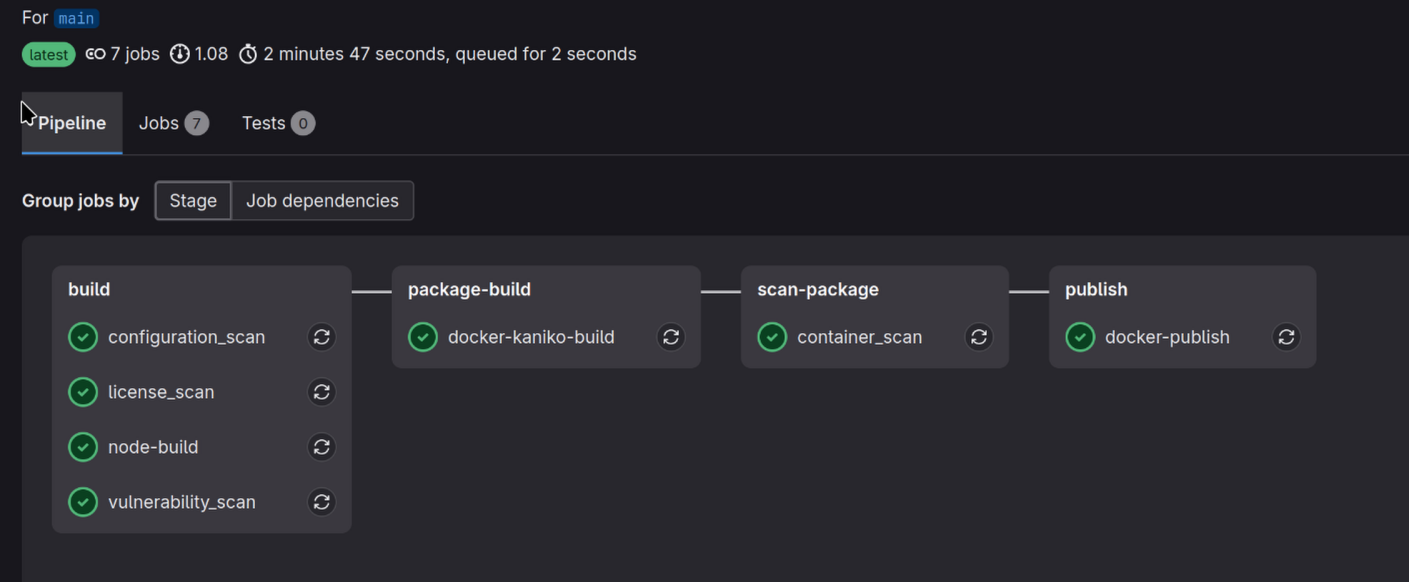 Figure 7. Final pipeline with trivy repo and trivy image jobs
Other tools / services
I found out about Trivy when trying to implement vulnerability scanning for several projects, we were using Gitlab-CI and a google search took me to To be continuous project. As part of their documentation they publish a custom markdown security report of the container images used in the Gitlab templates provided by the project, this report is generated with Trivy, the report is here: TBC Vulnerability Report
However, Trivy is not the only alternative for this, there are tons of other projects or services that can be used:
For a more detailed list see this community post in the OWASP portal: Source Code Analysis Tools
Summary
In this post, we explored several of the functionalities of Trivy,
focused mostly on repo and image and scanning for vulnerabilities, secrets and licenses.
But Trivy offers much more like scanning your AWS account infrastructure, generating sbom files, scanning kubernetes cluster for misconfigurations, it’s plugin ecosystem and much more.
Checkout their complete documentation and start incorporating Trivy into your Software Development Lifecycle today!
Comments
To add comments, reply in my Bluesky post